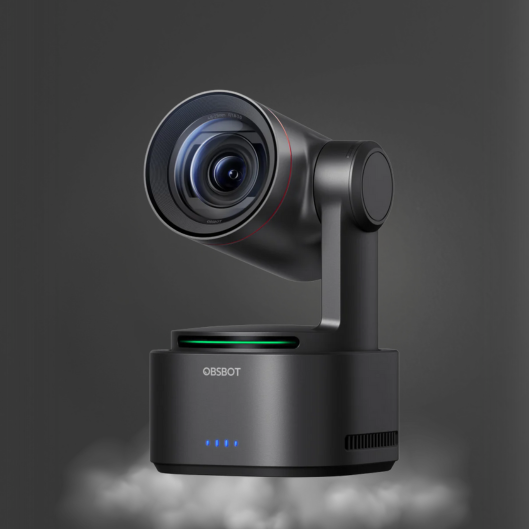
PTZ Cameras Versus Camcorders for Live Production
A keynote speaker walks away from the lectern, turns toward the audience, and the shot is suddenly too wide. In a one-person livestream or a lean event crew, that moment determines whether the production feels controlled or improvised. The decision between PTZ cameras versus camcorders is not simply about image quality. It is a decision about who operates the camera, how many angles the production needs, and whether the workflow must react in real time.
A camcorder puts manual camera operation and flexible lens control in the hands of an operator. A PTZ camera places pan, tilt, zoom, presets, and, on selected models, AI tracking inside a compact camera body that can be controlled from across the room or over a network. Both can produce professional results. The right choice depends on the production environment.
PTZ Cameras Versus Camcorders: The Core Difference
The fundamental difference is camera placement and control. A camcorder is designed to be handled. It can move with a subject, change position quickly, and support the operator's visual judgment through a viewfinder or monitor. Its controls are immediately available at the camera, which is valuable for documentary work, interviews, field coverage, and any shoot where the camera must move with the action.
A PTZ camera is designed to stay installed. It can be mounted at the back of an auditorium, above a classroom display, on a studio wall, or in a worship space where an operator cannot stand near the camera. From a control panel, software interface, or video-production system, the operator can reposition the camera without entering the shot or interrupting the event.
That distinction affects staffing. One camera operator can run a camcorder well, but every additional handheld or tripod-mounted camcorder usually requires another person. A single operator can control multiple PTZ cameras, recall saved framing presets, and switch sources during a live show. For recurring productions, that staffing advantage is often the strongest argument for PTZ.
When a PTZ Camera Is the Better Production Tool
PTZ cameras are built for fixed-location production where repeatability matters. Education teams can save a presenter position, whiteboard framing, and wide classroom shot before the session begins. Corporate communications teams can create presets for a podium, panel discussion, and audience Q&A. Event producers can install cameras in positions that would be difficult or unsafe for an operator to occupy.
Remote control changes the crew requirement
Pan, tilt, and optical zoom control let the operator make framing adjustments from the production position. Presets make the workflow faster still. Instead of manually finding the podium every time a speaker returns, the operator recalls the assigned preset. The result is more consistent framing and fewer visible corrections.
This approach is particularly effective in multi-camera livestreams. A PTZ camera can supply a close presenter shot, a second unit can cover a wide stage angle, and a third can capture a panel or demonstration area. Combined with a live video switcher, the production can move among sources without needing several camera operators on the floor.
AI tracking can reduce manual camera moves
AI-powered PTZ and PTZR cameras add another operational option: automatic subject tracking. When a presenter moves through a defined area, tracking can maintain a usable composition without continuous joystick input. This is useful for solo creators, instructors, fitness presenters, pastors, and presenters who need to move naturally instead of standing in a fixed mark.
Tracking is not a substitute for an experienced camera operator in every situation. Crowded stages, multiple similar-looking subjects, obstructed faces, and fast transitions can challenge any automated system. It is best treated as a production tool that reduces repetitive correction, especially in predictable environments.
Networked workflows favor PTZ installations
Many professional PTZ options support IP-based video and control workflows, while certain models add NDI connectivity. For studios, corporate networks, and permanent AV installations, this can reduce the number of separate cables required at each camera position. Video, control, and sometimes power can be organized through a network infrastructure, depending on the equipment and configuration.
This does require planning. Network bandwidth, switch capability, cable runs, latency expectations, and protocol compatibility should be confirmed before purchase. An NDI-enabled camera is valuable when the entire workflow is ready for NDI. It is not automatically the best choice for a simple single-camera HDMI setup.
When a Camcorder Still Has the Advantage
Camcorders remain highly capable tools because they give the operator direct physical control. Their strength is not that they are older or more traditional. Their strength is adaptability.
A camcorder is usually the better choice when the scene changes faster than a fixed installation can accommodate. Wedding coverage, sports from the sidelines, run-and-gun interviews, news-style event coverage, and behind-the-scenes work all benefit from a camera that can be carried, repositioned, and operated close to the action.
Operator-led framing is more responsive
A skilled camcorder operator can anticipate movement, adjust composition before it becomes a problem, and make subtle corrections that automated tracking may not recognize. They can change position for a more flattering angle, manage foreground elements, and respond creatively to an unexpected moment.
Camcorders also commonly provide a familiar set of production controls for exposure, focus, white balance, audio input, and lens operation. The exact control set varies by model, but the physical camera-first workflow remains attractive to teams that already have experienced operators.
Lens flexibility matters for difficult venues
Long-distance coverage is one area where camcorder lens design can be decisive. In a large venue, sports field, or outdoor event, the ability to work with strong optical zoom and quickly reframe from a new physical position can outweigh the convenience of remote PTZ operation.
Low-light performance should also be evaluated by the actual camera model rather than category alone. Sensor size, lens aperture, image processing, and gain behavior all influence the final image. A premium PTZ camera may outperform an entry-level camcorder in one setting, while a professional camcorder may offer better results in another. Compare technical specifications and test in the lighting conditions that matter to your production.
Image Quality Is Only One Part of the Decision
It is easy to compare cameras based on 4K resolution, but resolution alone does not determine a polished stream or recording. Framing consistency, motion handling, exposure, color matching, and audio all have an equal effect on perceived production quality.
A 4K PTZ camera can provide detailed, clean imagery for a permanent studio, lecture hall, or streaming room. If the final program is delivered in HD, the additional resolution can still help with cropping and image processing in a compatible workflow. However, 4K also increases demands on capture devices, switching systems, storage, and network infrastructure.
A camcorder may offer equally useful 4K capture while giving the operator greater freedom to control the scene. The better image is the one the team can frame, expose, and deliver reliably for every session.
Audio deserves the same discipline. Neither a PTZ camera nor a camcorder should be expected to solve room sound by itself. Use purpose-built microphones for the application: a wireless lavalier for a presenter, a shotgun microphone for targeted pickup, conference microphones for meeting rooms, or dedicated vocal microphones for a studio or stage. Clear speech often improves a production more noticeably than a modest camera-spec upgrade.
Building the Right Workflow Around Each Camera Type
For a solo creator streaming from a desk, a compact AI tracking PTZ or PTZR camera can be more efficient than a camcorder because it maintains framing while the creator demonstrates products, writes on a board, or moves through a presentation. For a fixed podcast studio, multiple PTZ cameras can create several controlled angles without filling the room with operators.
For a corporate town hall or house-of-worship service, PTZ cameras often make sense as the primary installed system. Preset-based framing, remote operation, and multi-camera control help a small team cover a large room. A camcorder can still serve as a mobile secondary camera for aisle shots, audience reactions, or special events.
For event videography, documentary work, or location-based commercial production, start with camcorders when the crew needs to follow action and constantly change position. Add PTZ cameras when a fixed wide shot, remote angle, or unattended camera position would increase coverage without increasing labor.
The strongest setups are often hybrid. A PTZ system handles repeatable, remote-controlled angles while a camcorder captures the close, mobile, operator-led perspective. A compatible switcher brings both into one live program, and dedicated microphones preserve intelligibility across every camera angle.
Choose for the Production You Run Repeatedly
Do not choose a camera category based only on the most demanding shoot you might do once a year. Choose for the production you need to deliver every week. Consider the number of operators available, the distance from camera to subject, the need for movement, the cable and network plan, and whether repeatable presets would save time.
Kong Kei customers building compact livestream systems should also plan the complete signal path: camera output, control method, switcher inputs, display or recording destination, and microphone capture. A camera with advanced tracking or NDI capability delivers its best value when the surrounding workflow supports it.
If your production needs fixed angles, remote operation, AI-assisted framing, and efficient multi-camera coverage, PTZ is likely the practical starting point. If it needs mobility, fast physical repositioning, and creative operator control, start with a camcorder. When both requirements exist, design the system around both tools and let each camera handle the work it does best.