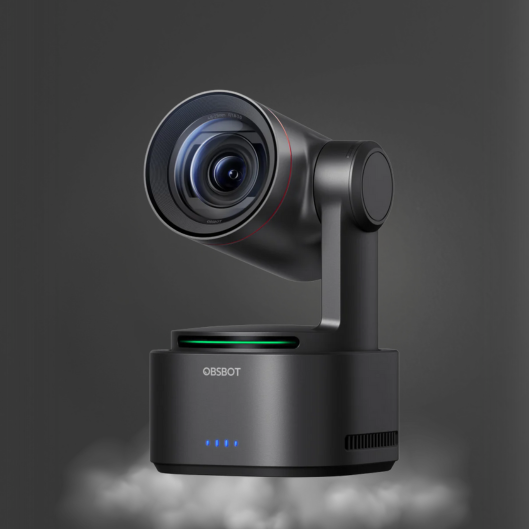
7 Best Cameras for Product Demonstrations
A product demonstration fails fast when the audience cannot see the control you are pressing, the material you are comparing, or the result you are describing. The best cameras for product demonstrations do more than produce a sharp image. They hold focus at close range, preserve color under mixed lighting, frame the presenter and product intelligently, and connect cleanly to the rest of a live-production workflow.
For a solo creator showing small products at a desk, a compact 4K AI webcam may be the right tool. For a training team walking through a machine or presenting in a showroom, a PTZ camera with optical zoom and remote control can reduce the need for an operator. The correct choice depends on product size, shooting distance, delivery platform, and whether the demonstration is live, recorded, or both.
What a Product Demonstration Camera Must Do
A standard conference webcam can make a presenter look acceptable from a fixed seat. Demonstrating a product is more demanding. The camera must resolve fine details, respond quickly when a product enters the frame, and maintain a usable image as hands move between the lens and the subject.
Start with 4K capture. Even when your final stream is 1080p, a 4K sensor provides more room to crop a close-up, create a second angle in post-production, or use digital zoom without immediately losing critical detail. This matters for electronics ports, cosmetic textures, food preparation, tools, product labels, and small mechanisms.
Autofocus performance is equally important. A camera that hunts focus every time you lift an item toward the lens distracts from the presentation and makes fine details difficult to inspect. Look for fast autofocus designed for near-to-far transitions, along with manual exposure and white-balance control. Auto settings are convenient, but they can shift brightness or color midway through a demonstration when a reflective package or a white product enters the frame.
Framing control is the third requirement. AI tracking is useful when the demonstrator moves between a workbench and a standing position. PTZ movement adds another level of control, allowing an operator to set wide, medium, and detail presets without repositioning the camera. For live selling, training, and corporate presentations, that flexibility has a direct effect on production pace.
7 Best Cameras for Product Demonstrations
1. OBSBOT Tiny 2 for desktop demonstrations
The OBSBOT Tiny 2 is a strong choice for creators demonstrating products from a desk, counter, or small studio. Its 4K output, AI tracking, and compact PTZ design allow the camera to follow a presenter while keeping the workspace in view. It is particularly effective when one person needs to explain a product, show a close-up, and return to a face-forward presentation without stopping the recording.
Its compact format is an advantage, but it is not a substitute for an overhead camera when the entire demonstration happens on a tabletop. Place it at eye level for presenter-led sections, then add a second angle for hands-on work if your products have small details.
2. OBSBOT Tail 2 for active presenters and larger spaces
The OBSBOT Tail 2 suits demonstrations that extend beyond a desk. Its AI-powered PTZR operation is useful for presenters moving across a stage, showroom, classroom, or production area. Rather than relying on a fixed wide frame, the camera can follow the subject while preserving a more purposeful composition.
This is the better fit for fitness equipment, appliances, instruments, workshop tools, and other products that need room to be shown in use. The trade-off is that a moving camera should be configured deliberately. Set tracking zones and framing preferences before going live so the system prioritizes the demonstrator rather than a person passing through the background.
3. OBSBOT Tail Air for flexible multi-camera live production
For teams that need compact camera placement and network-oriented workflows, the OBSBOT Tail Air is worth considering. Its small body can be placed on a tripod, mounted for a side view, or positioned to capture a product station without filling the set with large camera rigs. AI tracking and PTZ control support unattended operation in dynamic demonstrations.
It is most useful when paired with a switcher or software production environment that can manage several angles. A wide shot can establish the presenter, while a Tail Air handles a side angle or close operational view. Confirm the connection format required by your specific workflow before purchase, especially if your production depends on NDI, HDMI, USB, or network control.
4. A 4K fixed webcam for tight, controlled close-ups
A fixed 4K webcam is often the most efficient option for product sellers who work from a consistent bench setup. With good lighting and a solid mount, it can produce a clean close-up of packaging, small accessories, documents, or handheld products. The lack of mechanical movement is not necessarily a limitation when the product position never changes.
Choose this approach when speed and simplicity matter more than camera movement. It works well for marketplace listings, short product explainers, one-person livestreams, and support videos. Use a separate presenter camera if you need frequent transitions between face-to-camera delivery and tabletop detail.
5. A PTZ camera with optical zoom for showrooms and training rooms
A professional PTZ camera with optical zoom is the practical choice when the product cannot be brought close to the lens. Vehicles, industrial equipment, large displays, commercial kitchen equipment, and installed systems all benefit from zoom that is optical rather than purely digital.
Optical zoom lets an operator move from a room-wide view to a control panel or component without placing a camera in the presenter’s working area. PTZ presets also make repeated demonstrations consistent. Save one position for the presenter, one for the full product, and one for the primary feature being explained. That repeatability is valuable for daily livestreams and recurring customer training.
6. An NDI-ready PTZ camera for networked production teams
An NDI-ready PTZ camera is best for teams operating multiple cameras across a larger room, studio, church, classroom, or event space. A network workflow can reduce cable complexity while providing video, control, and monitoring through infrastructure designed for live production.
This category makes sense when the demonstration is part of a larger program with multiple sources, remote operators, graphics, and switching. It is less necessary for a single USB-based desktop setup. Network production has real advantages, but it also requires reliable networking, appropriate bandwidth planning, and an operator who understands the signal path.
7. A professional camera and switcher package for high-value launches
For major product launches, executive presentations, or live commerce programs with several presenters, a professional camera package paired with a dedicated switcher provides the greatest control. Use one camera for the host, one for the product detail, and one wide angle for the complete set. A live video switcher allows the producer to cut between them at the exact moment a feature is introduced.
This approach is appropriate when poor framing or a missed close-up has a business cost. It also creates a cleaner experience than asking one camera to do every job. CineTreak cameras and live video switchers are relevant for productions that need a compact but more deliberate multi-source setup.
Build the Shot Before You Upgrade the Camera
A better camera cannot correct a poorly planned demonstration. Mount the close-up camera at an angle that keeps hands from blocking the product. For tabletop shots, an overhead or high three-quarter position often shows more than a straight-on view. Leave enough space around the product for cropping, graphics, or a picture-in-picture presenter feed.
Lighting determines whether 4K detail is actually visible. Use broad, diffused light to reveal texture without creating harsh reflections. Glossy surfaces, screens, glass, and metallic products may need the lights moved off-axis. Lock white balance once the scene looks correct, particularly when product color is part of the buying decision.
Audio deserves the same planning. A clean lavalier, shotgun, or conference microphone keeps feature explanations intelligible while the camera focuses on the product. For multi-camera streams, route audio through the switcher or production software from one controlled source rather than relying on each camera’s built-in microphone.
Choose for the Workflow, Not the Spec Sheet Alone
The best choice is rarely the camera with the longest feature list. A compact AI webcam can outperform a higher-end PTZ camera when the entire demonstration happens within two feet of a desk. Conversely, a fixed webcam cannot replace optical zoom and preset control in a showroom or training room.
Before selecting equipment, define your primary shot, your closest required detail, and how often the presenter moves. Then identify the connection your production system actually accepts. USB is direct and efficient for a single computer. HDMI supports conventional switching. NDI-ready workflows are better suited to networked, multi-camera environments.
Kong Kei Industrial can help buyers assemble a matched camera, switching, and audio configuration rather than treating each device as an isolated purchase. Start with the view your audience must see most clearly, then build the production system around making that view reliable every time.