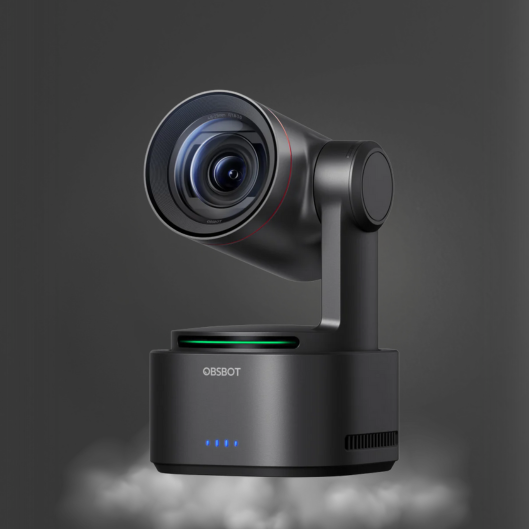
CineTreak Switcher Review for Live Production
A live production can look polished or improvised based on one decision made before the stream begins: how sources are switched. This CineTreak switcher review focuses on the questions that matter in a real production room - source compatibility, operator control, audio handling, output routing, and how the switcher fits with cameras, computers, and displays already in use.
A switcher is not simply a device for moving from Camera 1 to Camera 2. It is the control point for a multi-camera program feed. For creators, education teams, worship productions, corporate AV departments, and small studios, the right unit reduces the number of manual workarounds required during a live event. The wrong one adds format conflicts, audio delays, and unnecessary pressure on the operator.
CineTreak Switcher Review: The Practical Verdict
CineTreak live video switchers are best evaluated as workflow equipment rather than as isolated hardware. The value is strongest when a production needs a dedicated way to select multiple video sources, build a clean program output, and operate with more confidence than a camera-by-camera or software-only arrangement allows.
For a compact multi-camera setup, a hardware switcher can keep the operator focused on the production rather than on a crowded computer desktop. This is particularly useful when the show includes a host camera, a wide shot, a presentation computer, playback, or a remote guest feed. Tactile controls can make quick cuts and transitions more deliberate, while a defined program output simplifies the path to an encoder, recorder, monitor, or streaming computer.
The trade-off is that a switcher must match the rest of the signal chain. A capable unit cannot correct a camera set to an incompatible frame rate, an audio source connected at the wrong level, or a computer configured for unsupported output resolution. Before choosing a CineTreak switcher, treat its available inputs, video formats, control options, and output paths as system requirements, not minor details.
Who Benefits Most From a Dedicated Switcher?
A CineTreak switcher is most compelling for productions where visual variety matters but staffing is limited. A one-person livestream operator can move between an AI-tracked presenter camera, a fixed wide camera, and slides without asking viewers to watch a software window change. A small corporate communications team can create a more controlled town hall feed. Event producers can establish a consistent program look instead of relying on ad hoc camera connections.
It is also a sensible category for users who want to separate live switching from their primary production computer. Software remains useful for graphics, remote contributors, recording, and platform delivery, but putting source selection on dedicated hardware can make the workflow easier to repeat. This separation matters when a production has no room for a computer crash, an accidental window selection, or an operator searching through menus while a speaker is on camera.
A switcher may be unnecessary for a single-camera webcast with basic audio and no presentation content. In that case, investing first in better lighting, a stronger microphone, or a 4K camera may deliver a more visible improvement. The switcher becomes the priority when the production has multiple sources that need reliable, fast control.
Input Planning Determines the Experience
The first specification to review is input count, but counting connectors is only the beginning. Map every current source, then leave room for the source you will add later. A typical compact production might use a primary camera, a second angle, a laptop for slides, and a playback or graphics source. A larger setup may need dedicated feeds for a confidence monitor, a remote caller, or a document camera.
Just as important is the signal type. Confirm whether every camera and computer can connect directly to the switcher, or whether converters are required. HDMI is common in compact camera and computer workflows, while professional environments may require other video interfaces. Converters can solve a genuine compatibility issue, but they also add cost, cables, power supplies, and points of failure.
Frame rate and resolution discipline are equally important. Set connected cameras to the same production standard whenever possible. If the project is built around 1080p at a specific frame rate, configure cameras and computers to match before the event. A switcher may support scaling or conversion on certain inputs, but relying on that feature without testing can create unpredictable results, especially when presentation laptops change resolution.
Program Output Is Only One Destination
Think through where the finished program feed needs to go. In many setups, it goes to a streaming computer or hardware encoder. In others, it also feeds a room display, an external recorder, a confidence monitor, or a backup device. The ideal configuration depends on whether the event is online-only, in-room, or both.
A production that must send the program to several destinations should confirm output availability early. Splitting a signal after the fact may be practical, but it should be planned and tested. Operators should also determine whether they need a separate multiview display. Seeing all active sources, preview, and program at once is a major operational advantage, particularly when one person is responsible for switching and camera oversight.
Control, Transitions, and Daily Operation
The best switcher control layout is the one an operator can use correctly under pressure. Physical buttons are valuable because their position becomes familiar through repetition. Preview and program bus operation can offer an extra layer of safety for shows that use transitions, lower-thirds, or timed playback. Direct switching can be faster for straightforward events where clean cuts are the priority.
Do not judge transition effects by their quantity. A controlled cut, dissolve, or simple fade will serve most professional streams better than a library of animated effects. What matters is whether the operator can execute the intended action quickly and whether the unit gives clear feedback about which source is live.
If the CineTreak model under consideration supports external control, verify how that control fits the team. Some operators prefer direct panel operation; others need integration with a broader control environment. The requirement depends on production scale. A classroom studio and a recurring corporate webcast may value speed and simplicity, while an event control room may require a more structured control plan.
Audio Must Be Planned Alongside Video
Video switching is often treated as the main task, but poor audio will damage a production faster than an imperfect camera cut. Determine where audio will be mixed before purchasing any switcher. In a simple setup, the audio source may enter the switcher directly. In a more controlled system, microphones, music, and remote guest audio should be mixed externally, then delivered as a finished feed.
This decision affects gain staging, monitoring, and backup planning. For example, a conference microphone system, lavalier microphone, or shotgun microphone may need a dedicated mixer or interface before its signal reaches the switcher. A purpose-built audio path gives the operator better control of levels, mix-minus requirements, and speaker feedback prevention.
Always test audio sync with the complete system running. A camera, switcher, capture device, streaming application, and wireless microphone chain can each introduce delay. Do not assume that a configuration that sounds correct on headphones will remain synchronized after it reaches the viewing platform.
What to Verify Before You Buy
Use the product specification sheet to confirm these operational points before selecting a CineTreak switcher:
- The number and type of inputs match every camera, computer, and playback source in the current setup.
- Supported video resolutions and frame rates match the production standard used by the cameras and presentation computers.
- Program, preview, multiview, recording, and streaming output requirements can be met without improvised adapters.
- Audio connections support the intended microphone, mixer, and monitoring workflow.
- The control layout and available features suit the operator's experience level and the complexity of the show.
Building a Compact Camera-to-Stream System
A switcher performs best as part of a coordinated equipment stack. Pair it with cameras that can hold exposure, color, and frame rate consistently across a program. PTZ or AI tracking cameras can reduce the burden of manual camera operation for presentations, training, and worship services, while fixed cameras can supply dependable wide or audience angles. The switcher then becomes the point where those shots are turned into a watchable program.
For computer-based streaming, test the full path from switcher output to the streaming application before show day. Check that the capture device recognizes the selected format, confirm that the audio source is present, and monitor the final feed on the actual platform. At Kong Kei, this system-level approach is useful because cameras, switching hardware, and audio equipment should be selected for compatibility rather than purchased as unrelated components.
A practical test is to run a 20-minute mock program with every source live. Switch cameras, play slides, check microphone levels, trigger any graphics workflow, and watch the feed from a separate device. If the operator can perform those tasks without hesitation, the switcher configuration is ready for a real audience.
The most useful CineTreak switcher is not necessarily the model with the longest feature list. It is the one that accepts your sources, produces the outputs your event requires, and gives the operator a clear, repeatable way to tell the story on screen.