Video Mixers for Professional Live Production
A multi-camera stream can look polished or improvised based on one decision point: the switch. Video mixers put camera angles, presentation slides, remote guests, media playback, and graphics under one operator's control. For creators, corporate AV teams, educators, houses of worship, and event producers, the right mixer reduces production friction without limiting the formats and sources the workflow may need next year.
The best choice is not necessarily the model with the highest input count. It is the mixer that accepts your current camera signals, produces the required program feed, gives operators responsive control, and fits the way your team works under live conditions.
What Video Mixers Do in a Live Workflow
A video mixer, also called a live video switcher, combines multiple video sources into a single program output. During a live event or broadcast, the operator can cut from a wide shot to a close-up, bring up a lower-third graphic, roll a prerecorded video, or place a remote guest beside a presentation.
That sounds simple until a production includes different camera resolutions, computer outputs, audio sources, streaming encoders, confidence monitors, and recording devices. The mixer becomes the production hub. It determines which sources can connect, how images are converted or scaled, where audio is embedded, and how cleanly the final program reaches an audience.
For a one-person operation, the mixer can also replace a scattered collection of adapters, capture devices, and software windows. For a staffed production, it gives the technical director a dedicated, low-latency control surface for making decisions in real time.
Start With Sources, Outputs, and Signal Formats
Before comparing models, map the complete signal path. Count every source you expect to use, then reserve capacity for growth. A two-camera interview may also need a laptop for slides, a playback source, and a spare input for a guest computer. Buying only enough inputs for the first event often creates an avoidable bottleneck.
Camera connections deserve close attention. HDMI is practical for compact cameras, webcams, and short cable runs. SDI is generally better suited to longer distances, secure locking connectors, and production environments where cables are handled frequently. If your cameras provide NDI, an NDI-capable workflow can move video over a managed network rather than running a dedicated video cable to every camera. That can be highly efficient in classrooms, studios, and corporate spaces, but network design matters. A poor network is not fixed by adding more network cameras.
Resolution and frame rate must also match the intended output. A switcher may accept 4K sources while producing HD, or it may support only selected frame rates at particular resolutions. That can be a sensible trade-off if the stream is delivered in 1080p, but it should be confirmed before buying. Mixing 24p, 30p, 50p, and 60p sources can introduce conversion limits, extra latency, or unstable results depending on the equipment.
Outputs are equally important. Many productions need more than one: a program output for the encoder, a multiview output for the operator, and an auxiliary output for a stage display, projector, recorder, or confidence monitor. A model with an extra output may be more valuable than one with a few extra transitions if your event requires independent screen feeds.
Multiview Is an Operational Advantage
Multiview puts several inputs, the live program, preview, and audio meters on one display. It allows the operator to confirm framing and identify an incoming slide or camera before taking it live. For solo producers, this is one of the most useful features available because it prevents blind switching.
A multiview display is especially valuable when using AI-powered PTZ or PTZR cameras. AI tracking can keep a presenter framed without a dedicated camera operator, while multiview lets the producer verify that tracking behavior before switching to that shot. Automation reduces staffing demands, but it still benefits from an operator's oversight.
Choose Control for the Way You Produce
The physical controls on video mixers affect speed and confidence. Dedicated input buttons make it easy to cut directly to a source. Preview and program buses support a two-step workflow: select the next shot in preview, inspect it, then transition it to air. This is safer for formal events, live worship, corporate announcements, and broadcasts where an unexpected computer screen should never reach the program feed.
Compact switchers may prioritize direct switching, touch controls, or software configuration. They work well in mobile kits and small streaming setups, particularly when one person is operating cameras, audio, and the stream. Larger control panels offer more immediate access to keys, media, macros, and mix effects, which becomes important as productions add operators and repeatable show formats.
Macros can save time when they are used deliberately. A single command might recall a camera preset, change a graphic, switch to a presentation layout, and route an auxiliary output. For recurring training sessions or weekly services, this reduces repetitive setup. However, macros should be tested under real signal conditions. A shortcut that depends on a laptop waking correctly or a network device responding on time needs a manual fallback.
Video Mixers Need an Audio Plan
Viewers will tolerate a modest camera difference longer than they will tolerate unclear speech. A mixer may embed audio from HDMI or SDI sources and provide analog inputs, level controls, and audio-follow-video options. Those functions are useful, but they are not a substitute for deciding where audio should be mixed.
For a simple setup, connecting a quality microphone directly to the switcher may be appropriate. A CKMOVA lavalier, shotgun, conference microphone, or vocal microphone can be selected based on room conditions and speaker movement, then routed into the production chain with proper gain staging. For larger events with multiple speakers, music, audience microphones, and monitoring requirements, a dedicated audio mixer is usually the better center of control. It can send a finished mix to the video switcher for embedding.
Audio-follow-video can support quick camera changes, but it should be used carefully. Switching audio with every camera cut is rarely ideal when the same presenter is speaking. The production should preserve a consistent primary microphone unless there is a clear reason to follow the picture.
Features That Matter for Different Production Types
The right feature set depends on the job. A creator producing a two-camera livestream may value compact size, HDMI compatibility, USB output, and simple control. A corporate communications team may need reliable laptop support, picture-in-picture layouts, presentation outputs, and easy operation by non-specialists. A house of worship or event producer may prioritize SDI, multiple auxiliary outputs, multiview, graphics, recording, and dependable control during long programs.
Consider these common capabilities in the context of your actual show:
- Keyers place lower thirds, logos, green-screen talent, or graphics over a camera image.
- Picture-in-picture and split-screen effects keep a speaker visible beside slides, demos, or remote guests.
- Media players simplify playback of stingers, holding slides, sponsor assets, and prerecorded segments.
- Upstream and downstream keying options determine how graphics and transitions are layered.
- USB, Ethernet, or dedicated streaming outputs can simplify delivery to a computer, encoder, or network destination.
Build a System, Not a Collection of Devices
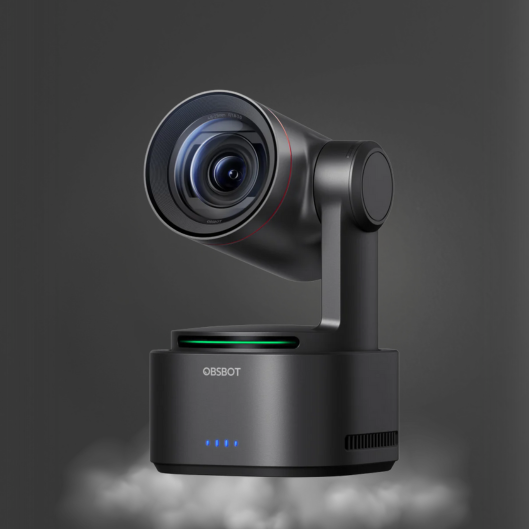
A video mixer performs best when cameras, control, audio, and monitoring are selected as one system. An OBSBOT AI tracking camera can reduce the need for a camera operator. A dedicated live switcher can combine that moving shot with a fixed wide angle, presentation computer, and media source. Purpose-built microphones ensure that the improved images are matched by intelligible speech.
Cable planning matters as much as headline specifications. Label sources at both ends, use appropriate cable lengths, secure connectors where people walk, and keep spare adapters available. Test every source at its intended resolution and frame rate before the event day. A laptop that works in a conference room may still output an unexpected format once it is connected to a switcher.
It is also wise to define a failure plan. Know which camera is the safe wide shot, which input can be cut if a computer fails, and how the audience will receive audio if a wireless microphone drops out. Redundancy is not only for large broadcasters. Even a small production benefits from a backup cable, alternate microphone, and a prepared holding graphic.
Select for the Next Production, Not Just the First
The most effective video mixers make complex live production manageable: they give the operator clear source visibility, predictable routing, practical audio integration, and enough I/O to avoid workarounds. Start with the signals you use today, then account for the camera, display, remote guest, or recording feed you are likely to add.
A well-matched switcher lets a small crew produce with the discipline of a larger team. Set up the signal path, rehearse the transitions, and let the equipment make the live moment easier to control.